STA 561 Final Project Zixuan Lin, Steven Chen, Xilong Li, Sicheng Zhang
This document is the technical appendix required by the assignment.
It contains the full system description, design rationale with
screenshots, a reproduction guide, limitations, and anecdotal
walkthroughs. The companion files are summary.md (two-page
executive summary, no jargon) and faq.md (skeptical-reader
FAQ). The interactive demo lives in the Jupyter notebook
561_final_p.ipynb, with the reusable tutor logic now
factored into chess_tutor_app.py.
Everything the system needs is checked into the repository except the Maia-2 checkpoint cache and the board UI asset cache, both of which are created locally on demand.
Repository: https://github.com/zixuan28/STA561_Chess_Tutor
Setup (macOS/Linux, Python ≥ 3.11):
git clone https://github.com/zixuan28/STA561_Chess_Tutor
cd STA561_Chess_Tutor
pip install -e .         # reads pyproject.toml (chess, maia2, requests,
                         # numpy, torch, ipywidgets, jupyter)
jupyter notebook 561_final_p.ipynb
Alternatively, with uv (the repo ships a
uv.lock):
uv sync
uv run jupyter notebook 561_final_p.ipynb
Run order inside the notebook: top to bottom. Kernel → Restart & Run All also works.
chess_tutor_app.py.rapid
checkpoint on CPU. On first run, Maia-2 may populate a local
maia2_models/ cache.LICHESS_TOKEN environment
variable is optional.ChessTutor
core object.chessboard.js page, and displays the IFrame. If
the cell is rerun, the previous local server is shut down first.Expected first-run artifacts: a
maia2_models/ directory holding the model cache, a
board_assets/ directory holding cached board UI assets, and
a local HTTP server on a random free port hosting the interactive
board.
Known requirements: the board UI now caches jQuery,
chessboard.js, chess.js, CSS, and the piece
images into board_assets/ the first time the interactive
board launches successfully. That first UI launch still needs outbound
network access; after the cache is warmed, later launches can reuse the
local copy.
Modern chess engines (Stockfish, Leela) play at a level that dwarfs any human, but their output is not designed for someone who is still learning. Pointing Stockfish at a beginner’s game produces centipawn scores and principal variations that assume the student already understands positional evaluation, piece activity, and deep tactical calculation. That is exactly the audience that most needs a tutor, and exactly the audience least equipped to make use of raw engine output.
The project description phrases the goal as a tutor that maximizes a given player’s improvement rather than one that hands out the “right” move. We took that literally: the tutor never prints a centipawn score. Instead, every piece of feedback is (a) grounded in a human-aligned move distribution at the student’s own Elo, and (b) translated into a short prose sentence the student can act on.
This report collects qualitative evidence — sample outputs from the tutor next to what a bare chess engine would have said in the same position — to argue that the resulting experience is more useful for a beginner or intermediate player than plugging the same position into Stockfish.
The tutor runs from a single Jupyter notebook
(561_final_p.ipynb), but the logic is now centralized in
chess_tutor_app.py so it can be reused and tested outside
notebook cells. It is built from three pieces:
rapid variant on CPU at startup
(cell 2).python-chess — legality, move
notation, attack maps, and the tactical heuristics that sit on top of
Maia-2’s move distribution.chessboard.js
IFrame — a self-contained HTML page (served on a random
localhost port, with cached JS/CSS inlined into the page and piece
images embedded as base64 data URIs) that renders the board, an Elo
slider (1100–1900 in 100-point steps), a FEN input, a sample-midgame
picker, an “Evaluate Position” button, a visible practice-pool panel,
tactical arrow overlays, and a live coach panel.The core object is ChessTutor (instantiated in cell 4,
defined in chess_tutor_app.py). Its public surface has
three entry points the UI calls into:
generate_feedback_payload(move) — runs Maia-2 at the
user’s Elo, attaches tactical detectors, and returns a short list of
prose lines.generate_bot_move() — samples the bot’s reply from
Maia-2’s top-5 human-likely moves (weighted by probability), so the
opponent blunders the way a human at that Elo blunders.evaluate_position_report() — standalone position
evaluator for the “Evaluate Position” button, satisfying the A+
criterion from the assignment.All three return natural-language output. None of them return a centipawn number.
Each subsection pairs a feature of our system with what a bare chess engine would produce in the same situation.
Stockfish at any reasonable depth plays moves a beginner will never understand — long positional maneuvers, subtle prophylaxis, zero tactical gifts. Just as importantly, Stockfish’s commentary does not change with the student’s rating: it prints the same centipawn score whether the person at the board is 1000 or 2200.
Our tutor routes every piece of feedback through Maia-2 at the
student’s declared Elo, so both the bot’s own moves and the coach’s
analysis of the student’s moves shift with the slider. To make the
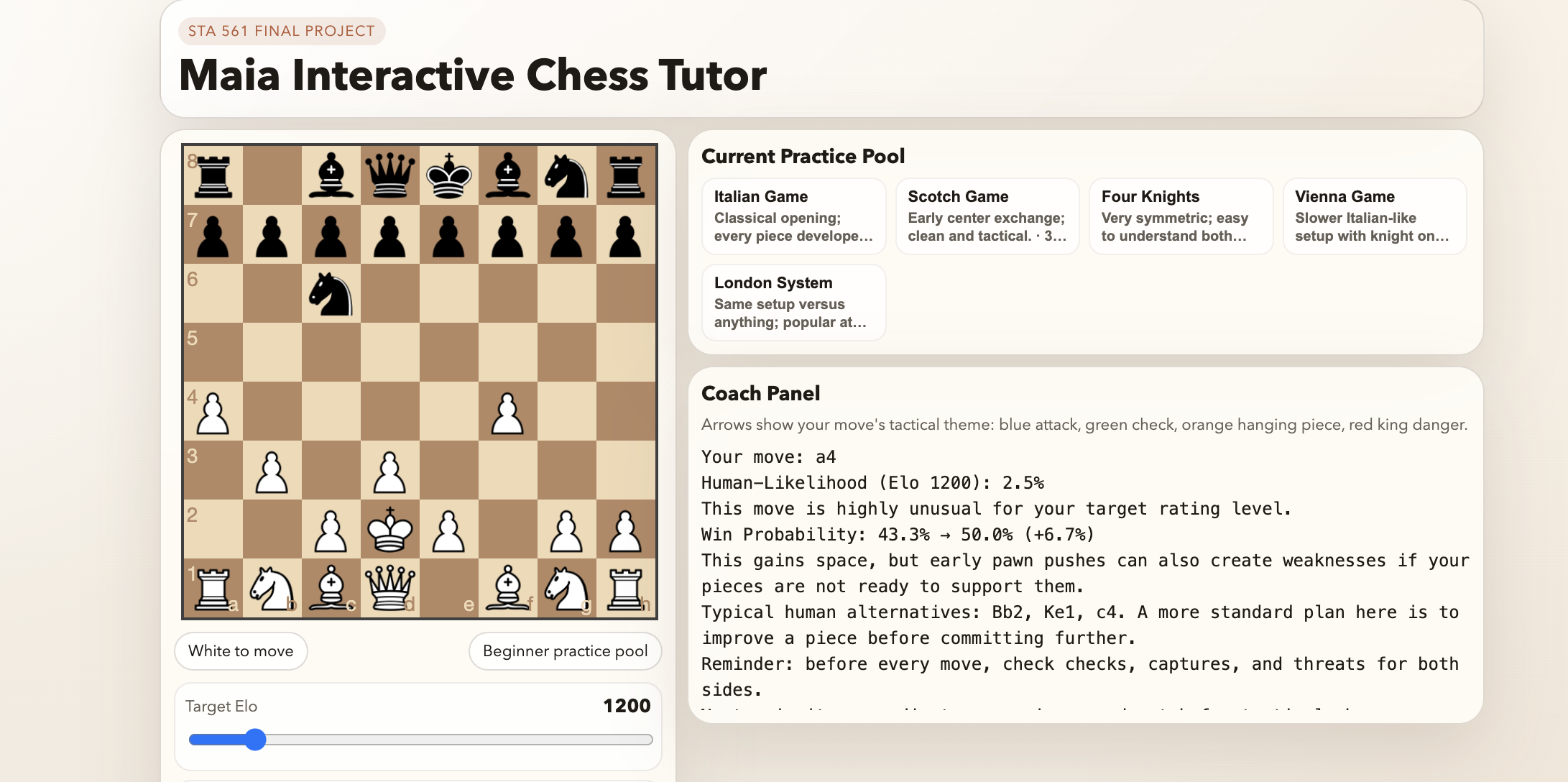
effect visible, the four figures below show the redesigned
board-and-coach layout on practice positions drawn from the beginner
pool (Figures 3.1a–b, Elo 1200) and the advanced pool (Figures 3.1c–d,
Elo 1800). The same pawn advance a4 appears in both bands
and is scored in opposite directions. The Coach Panel header also shows
the tutor’s tactical-arrow legend (blue attack, green check, orange
hanging piece, red king danger), which the move-level figures draw on
when a tactic is detected.
Figure 3.1a — Move analysis at Elo 1200. From a
beginner-pool position, the student plays a4. Maia-2
reports a human-likelihood of 2.5 % for a 1200-rated player (flagged as
highly unusual) but a positive win-probability delta of +6.7 % (43.3 % →
50.0 %). The commentary warns that “early pawn pushes can also create
weaknesses,” lists the more typical human choices at this level
(Bb2, Ke1, c4), and closes with the beginner-band reminder
to check for checks, captures, and threats on every move. An engine in
the same position would have reported a single centipawn score with no
process language at all.
Figure 3.1b — Position evaluation at Elo 1200.
Clicking Evaluate Position on the same board produces a
structured study plan: side to move, three human-likely candidate moves
(Ke1, c4, c3), a position-focus sentence calibrated to the
beginner band (“finish development and use your pieces to keep the king
area secure”), a qualitative balance assessment, and the recent move
history. None of this output is a number, and every sentence is
actionable without a database of engine lines.
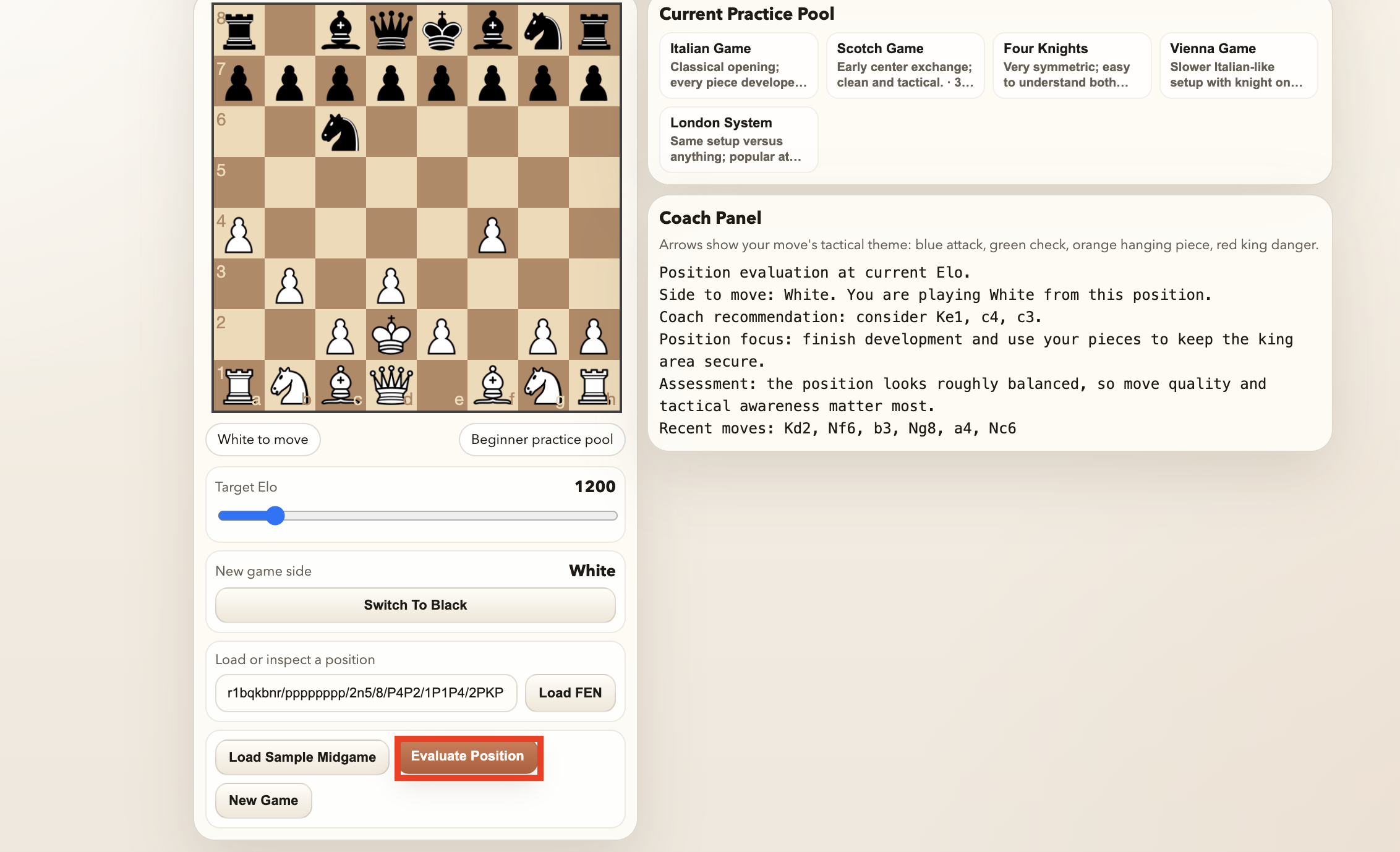
Figure 3.1c — Move analysis at Elo 1800. In an
advanced-pool position, the student plays the same pawn advance
a4. The tutor now assigns it a human-likelihood of only 0.1
% and, crucially, flips the win-probability delta negative (52.0 % →
48.8 %, −3.2 %). The typical alternatives listed also shift upward in
sophistication (Bb2, e5, d3), and the closing reminder is
the advanced-band one — “think about piece coordination, weak squares,
and whether the move creates long-term targets.” The contrast with
Figure 3.1a is the cleanest evidence for the calibration claim: the
same move, rated at two different levels, receives opposite-signed
win-probability deltas and qualitatively different reminders.
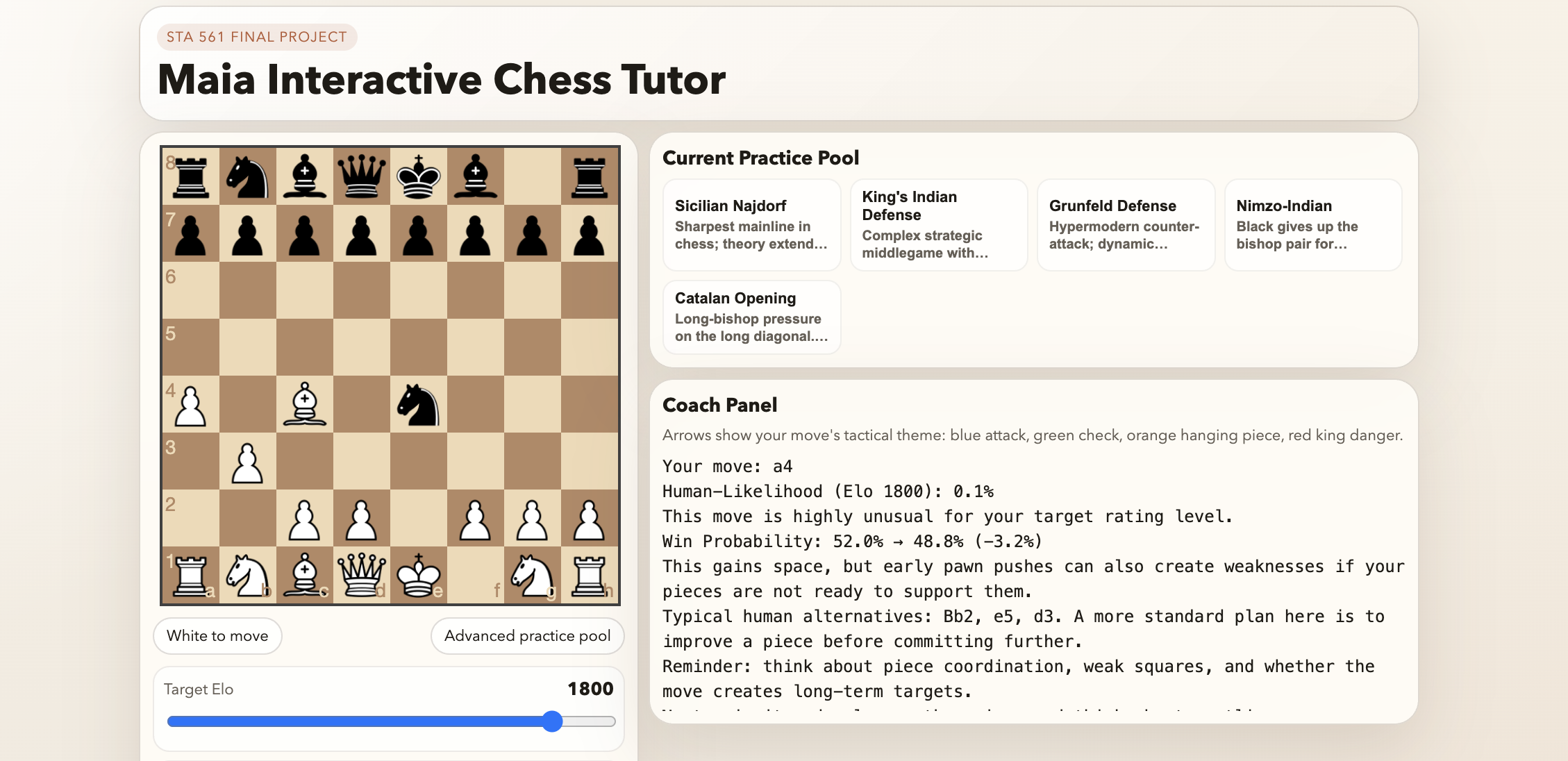
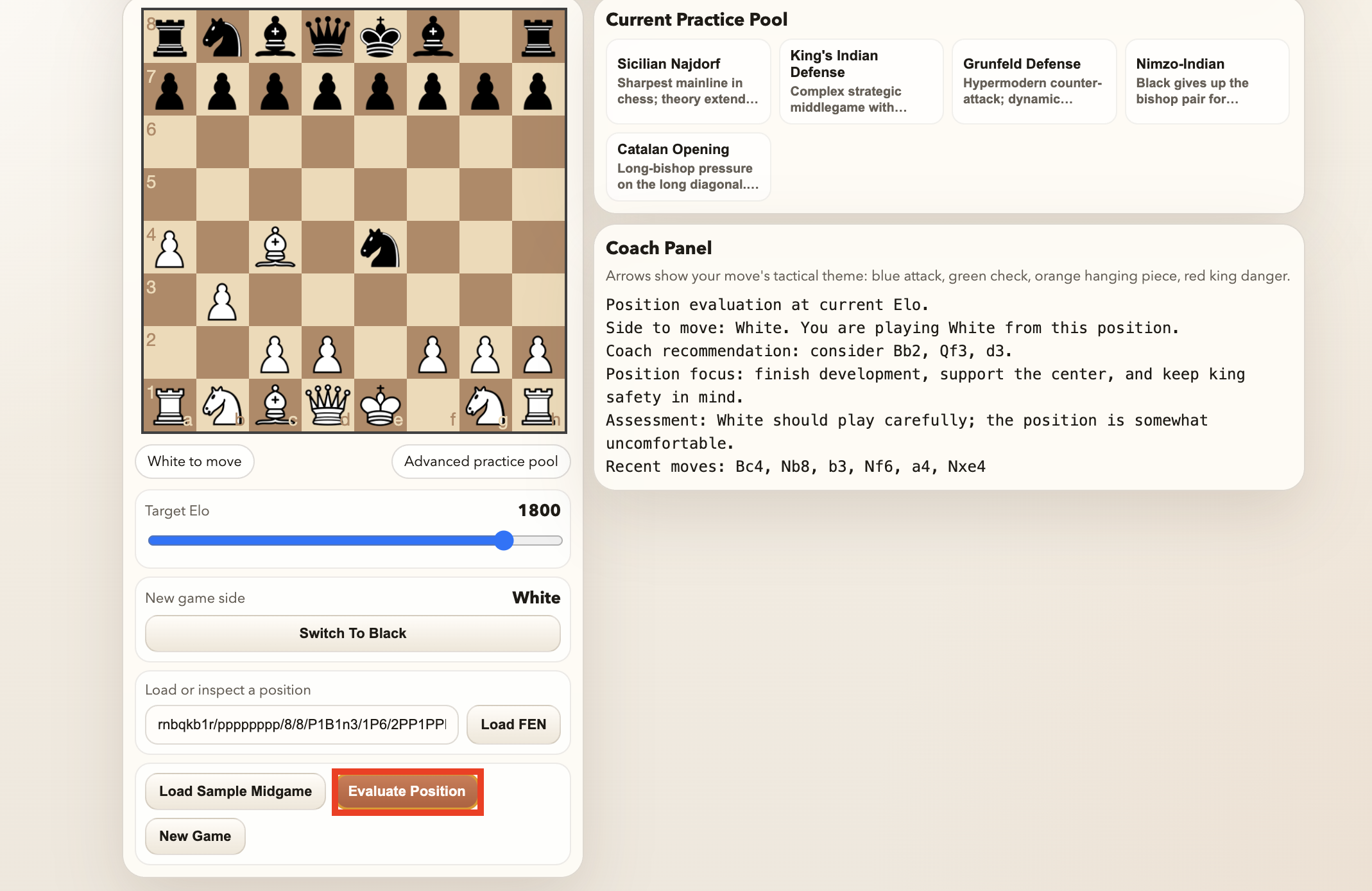
Figure 3.1d — Position evaluation at Elo 1800. The
Evaluate Position output also tracks the band. Candidate moves shift
from the beginner’s Ke1, c4, c3 to
Bb2, Qf3, d3 — a fianchetto, an active queen sortie, and a
central break that a club player is expected to calculate. The
qualitative assessment sharpens in the opposite direction from what a
naive reader might expect: where the beginner output called the position
“roughly balanced,” the advanced output says “White should play
carefully; the position is somewhat uncomfortable.” Higher Elo does not
simply mean the tutor becomes more optimistic — it means the tutor
raises the bar for what counts as comfortable.
Figures 3.2a–b below show the same position analyzed by two different
systems: our tutor at Elo 1200, and Stockfish 18 at depth 27. The
position is an open-game middlegame after a speculative white knight
sortie 4.Ng5 (the game reached it via a non-standard
opening line — see the Recent moves row in the tutor panel).
The side-by-side comparison is the cleanest single-page evidence for why
a learner gets more out of our tutor than out of a bare engine.
Figure 3.2a — Tutor output on 4.Ng5.
The Coach Panel reports the move’s Human-Likelihood (6.2 % for
a 1200-rated player, flagged as “highly unusual”), the Win
Probability delta (43.7 % → 36.6 %, a drop of 7.1 points), a named
tactical warning (“Caution: Your piece may be hanging. It lacks
sufficient defense on this square.”), three more typical human
alternatives (d3, O-O, Qe2), and a beginner-band process
reminder to check for checks, captures, and threats. None of these
outputs is a number in isolation; every line is written for a student to
act on.
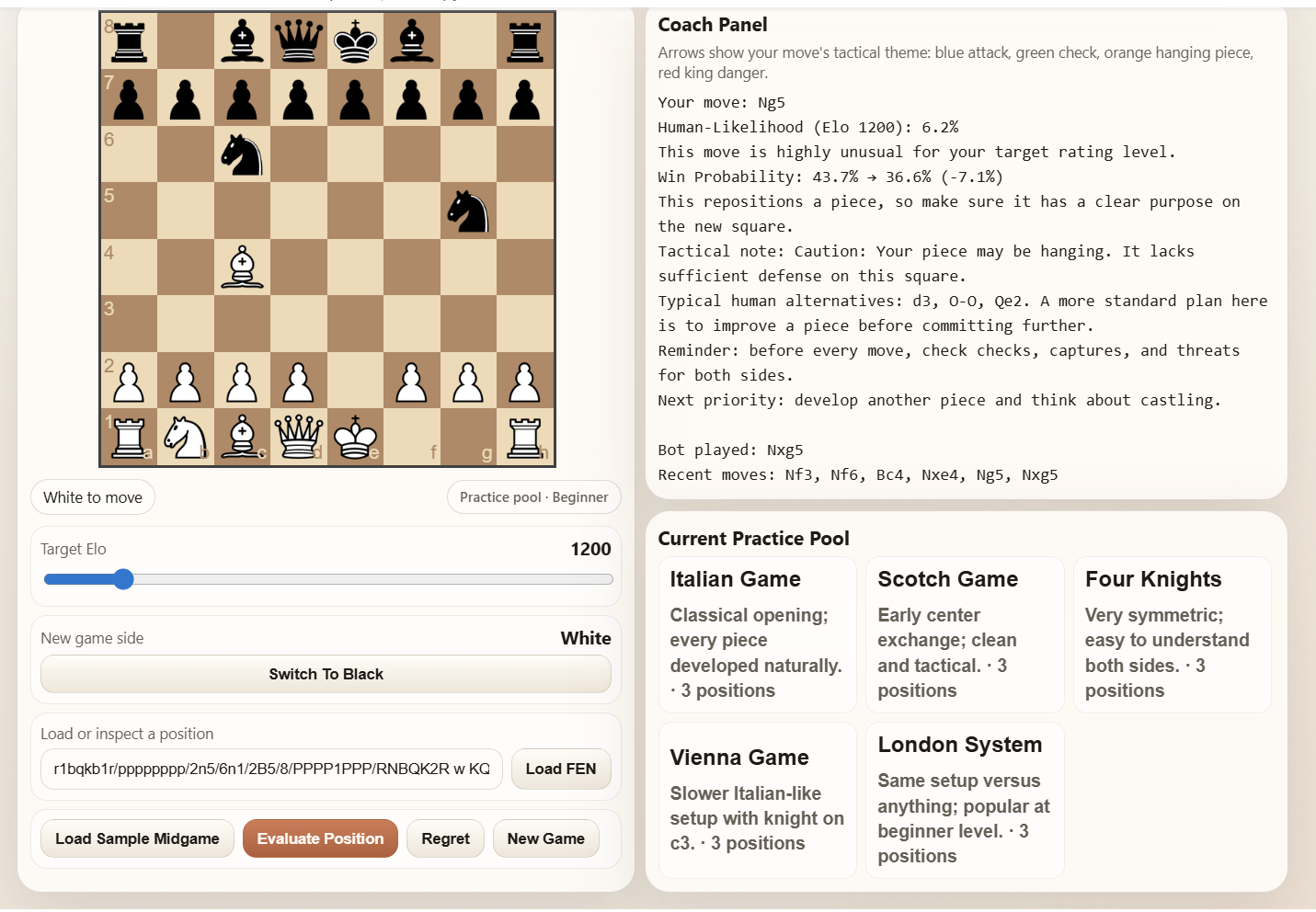
Figure 3.2b — Stockfish output on the same position.
Stockfish prints a single numeric evaluation of −4.4
(black is dramatically better) and a 5-move principal variation in
algebraic notation:
5. d4 e6 6. d5 exd5 7. Qxd5 Bb4+ 8. Nc3 Qe7+ 9. Be3 Ne4.
There is no commentary, no acknowledgement of the student’s rating
level, and no pedagogical language at all.
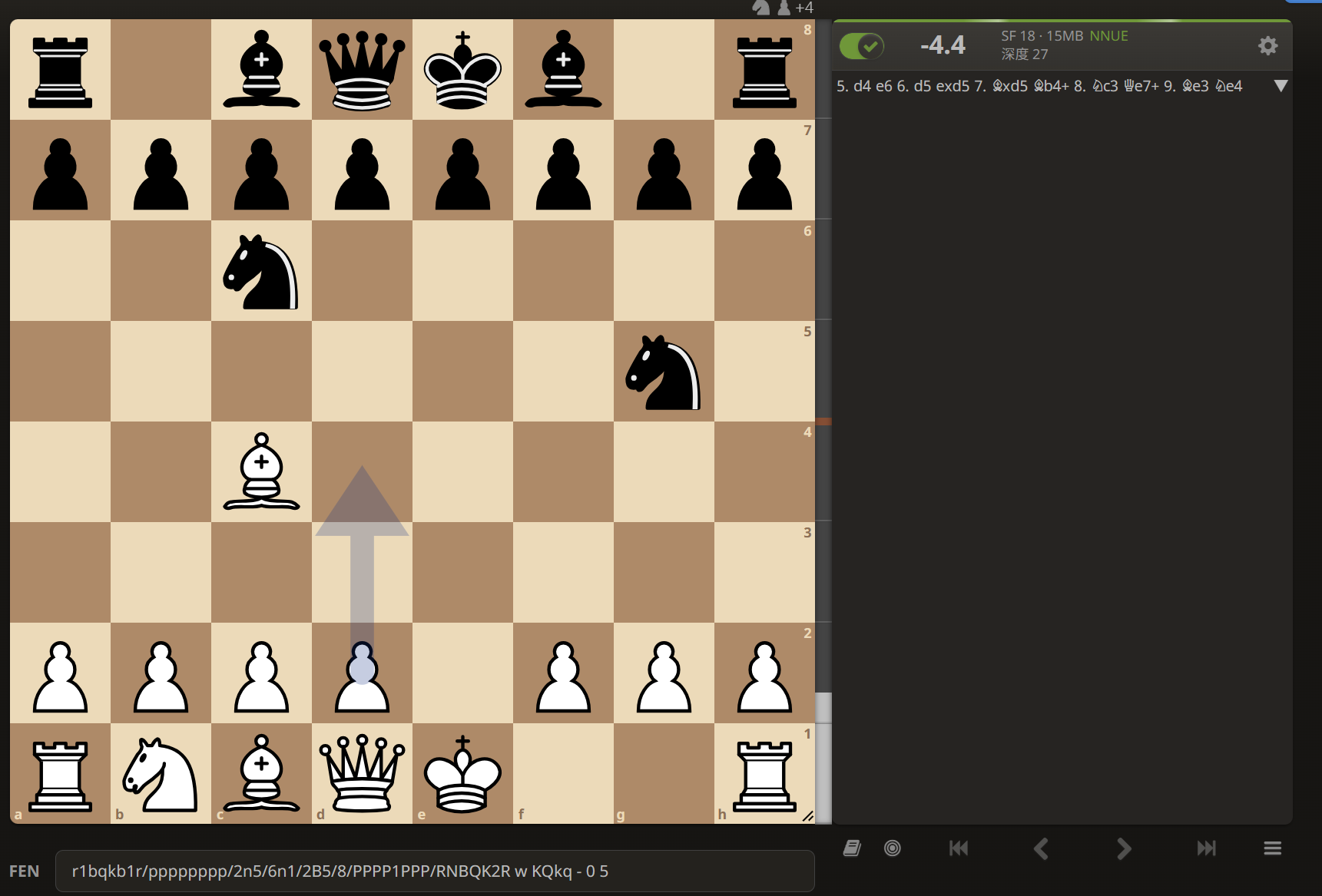
A beginner reading Figure 3.2b learns nothing actionable: the centipawn score and the algebraic PV both assume the reader already knows why those moves are critical. A beginner reading Figure 3.2a gets an explicit tactical diagnosis (“your piece may be hanging”), a behavioral comparison (“only 6.2 % of 1200-rated players would have chosen this”), three more typical alternatives by name, and a concrete process reminder tailored to their level. This is the qualitative difference the project set out to build.
ChessTutor now has five dedicated tactic detectors
(chess_tutor_app.py):
_detect_pin_blunder — fires if the moved piece was
absolute-pinned to its own king, and draws a red arrow from the piece to
the king._detect_fork — fires when the landing square attacks
two or more enemy pieces that are either higher-value or undefended, and
draws a blue arrow to each target._detect_discovered_attack — fires when a sliding piece
behind the moved piece gains a new attack path._detect_hanging_piece — fires when the destination
square has more attackers than defenders._detect_check — fires when the move gives check or
checkmate.Each detector emits one short English sentence plus optional arrows.
Stockfish, by contrast, reports score cp -280 and expects
the student to work out why the move was bad.
Figures 3.3a–b show two of the detectors firing in isolated test positions. Both setups were loaded via the Load FEN input so the move and the detector response can be read off the Coach Panel directly.
Figure 3.3a — Pin detector. Starting from the
position 4k3/8/8/q7/8/8/3B4/4K3 w - - 0 1 (white bishop on
d2 absolute-pinned by the black queen on a5 through to the white king on
e1), the student moves Bd2–c3. The detector fires with the
message “The piece you moved was pinned to your king, exposing a
critical vulnerability,” and draws a red arrow from the bishop’s
new square to the white king to make the pin visible on the board.
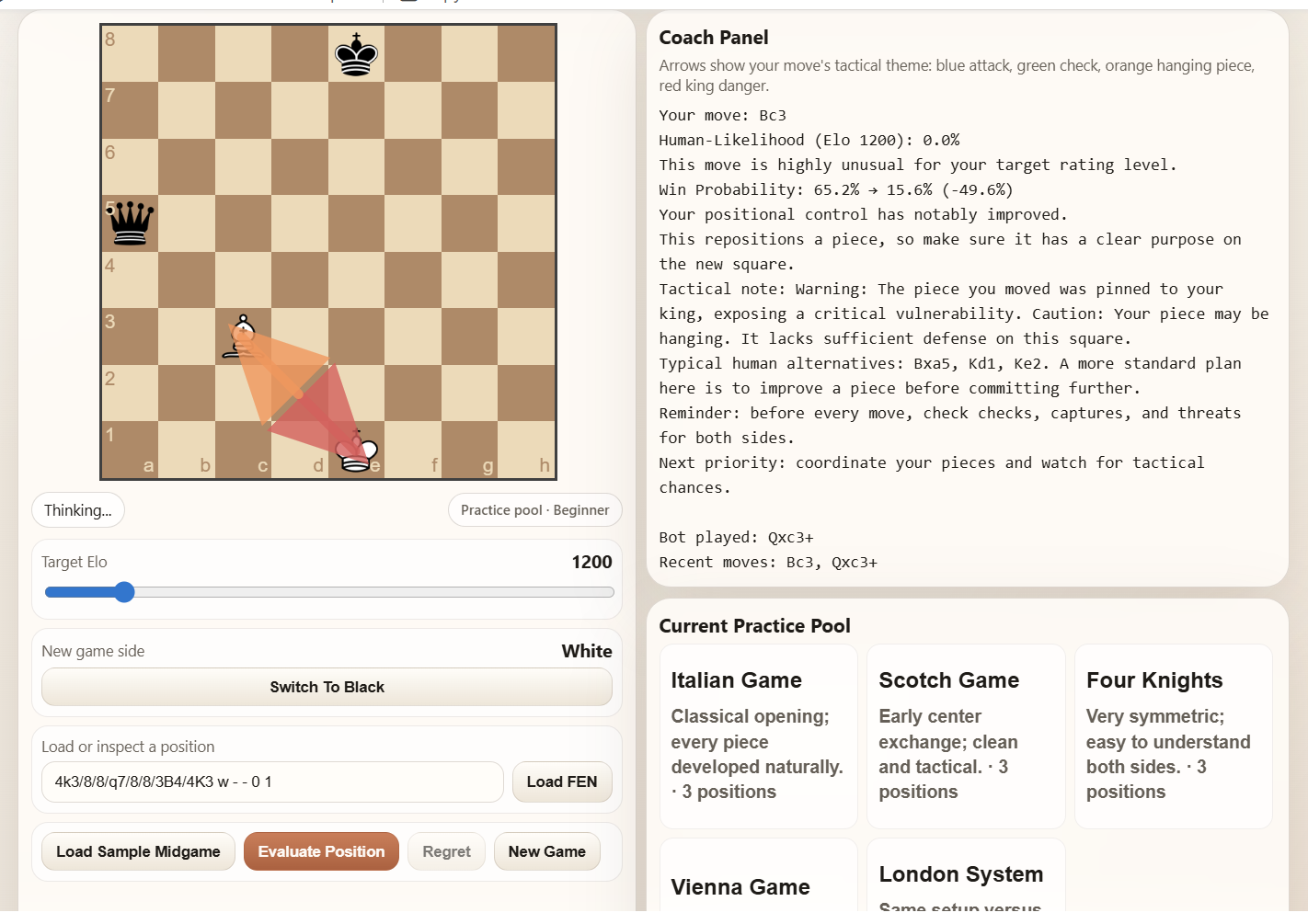
Figure 3.3b — Fork detector. Starting from
8/6k1/8/2r5/3N4/8/8/4K3 w - - 0 1, the student plays
Nd4–e6+. The knight lands on a square that simultaneously
attacks the undefended black rook on c5 and the black king on g7. The
detector fires with “Excellent vision. You have established a fork,
creating overlapping threats,” and draws blue arrows from the
knight to both forked targets.
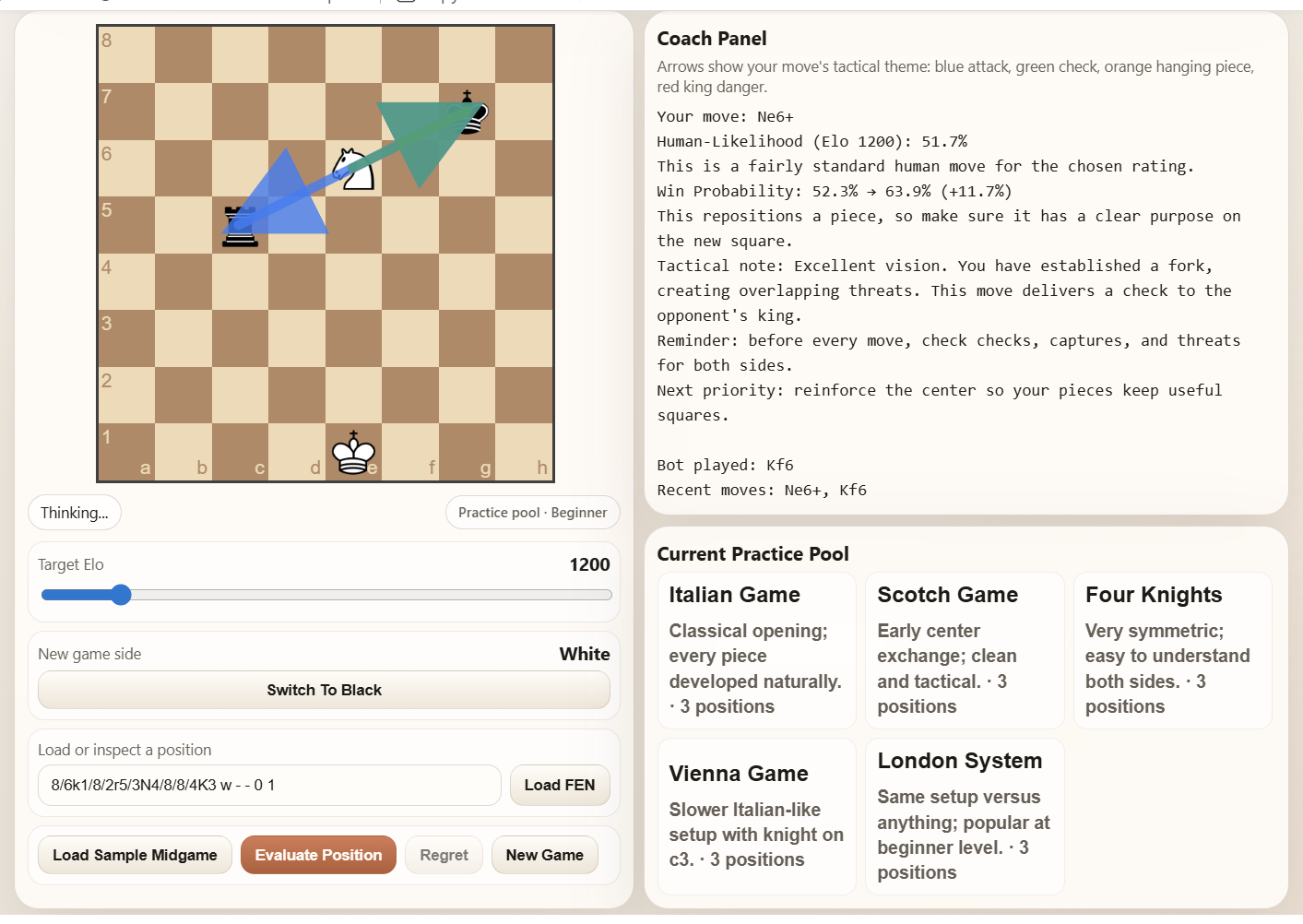
These two detectors are shown because they are the most visually
distinctive. The remaining three
(_detect_discovered_attack,
_detect_hanging_piece, _detect_check) behave
the same way — a named English sentence plus an optional colored arrow —
and their code paths are listed above.
Clicking Load Sample Midgame picks uniformly at
random from a band-matched pool. The pools (MIDGAME_POOLS
in chess_tutor_app.py) encode the pedagogy:
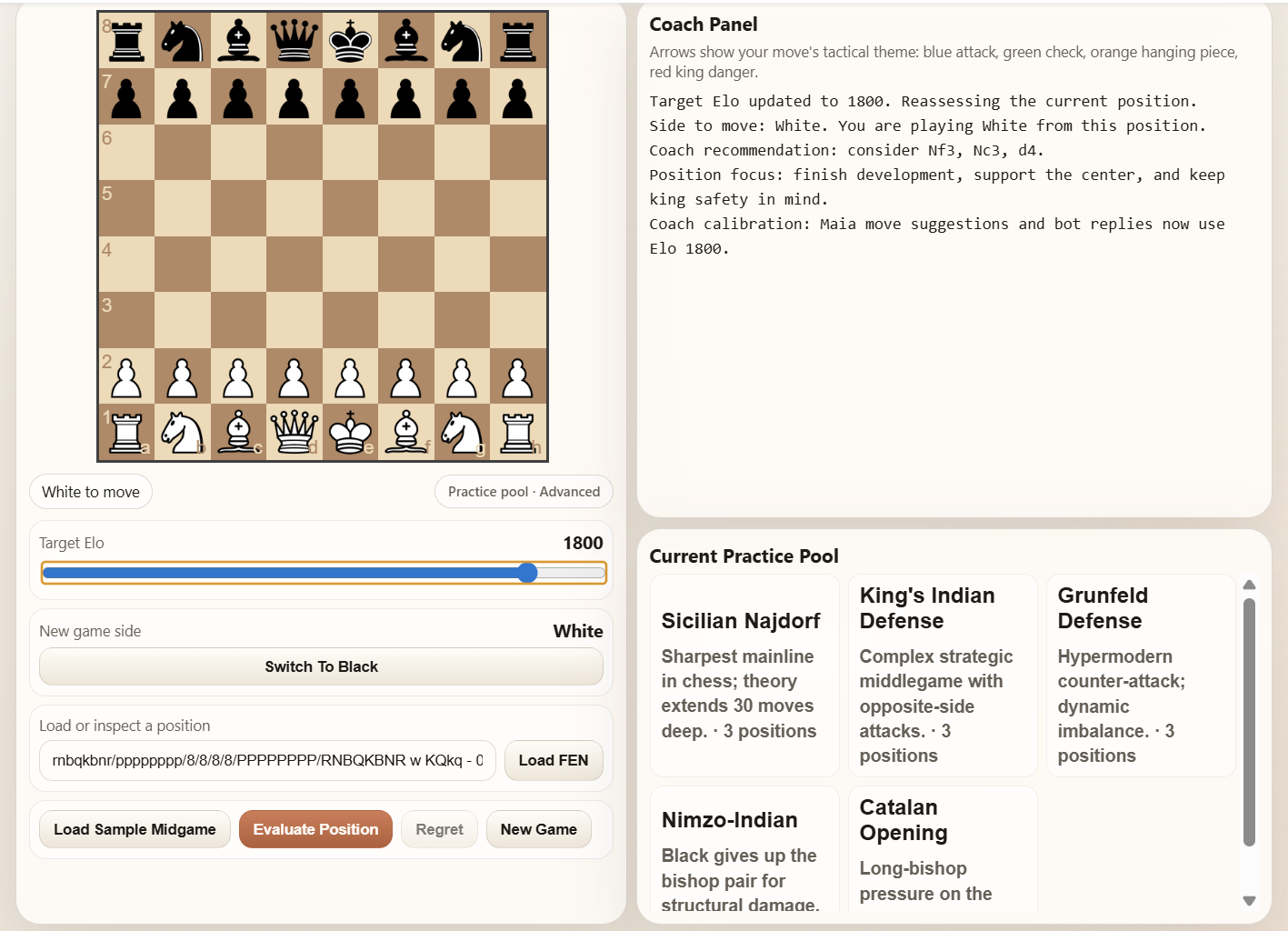
A bare engine could “analyze anything,” but that is the wrong affordance. A beginner given a Najdorf position will learn almost nothing; the tutor refuses to put one in front of them. The pool panel above the board also lists the five current-band options with one-line summaries, so the student can see what they are about to practice.
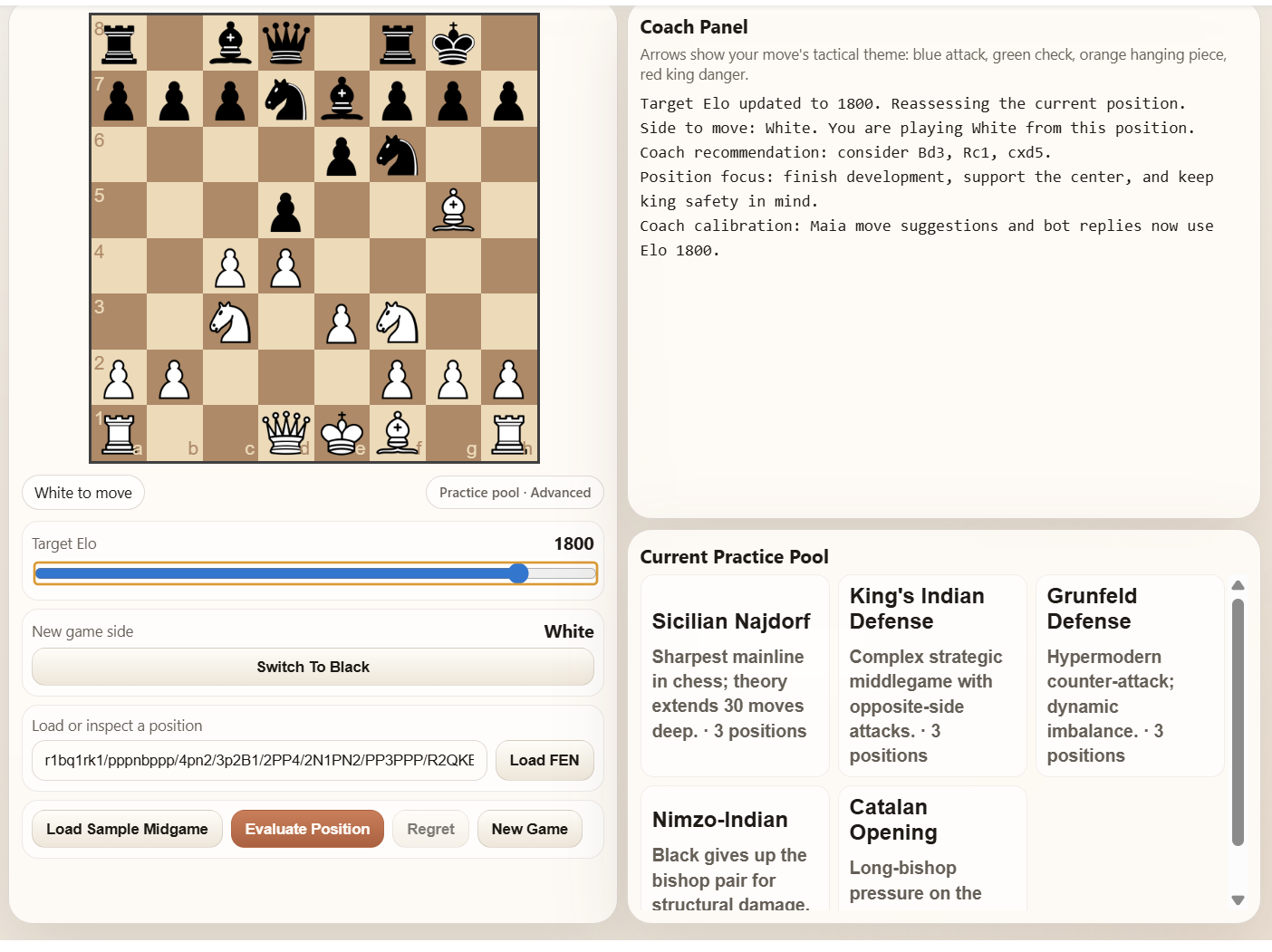
Figures 3.4a–c show the same board page at three Elo settings. Only the Current Practice Pool panel on the right changes: the Beginner band lists Italian Game, Scotch, Four Knights, Vienna, and London; the Club band lists Ruy Lopez Closed, Queen’s Gambit Declined, Caro-Kann Classical, French, and Slav; the Advanced band lists Sicilian Najdorf, King’s Indian Defense, Grünfeld, Nimzo-Indian, and Catalan. The Coach Panel also reports a “Target Elo updated” message each time the slider moves, confirming that the recommendation engine has switched bands.
Figure 3.4a — Practice pool at Elo 1200 (Beginner band).
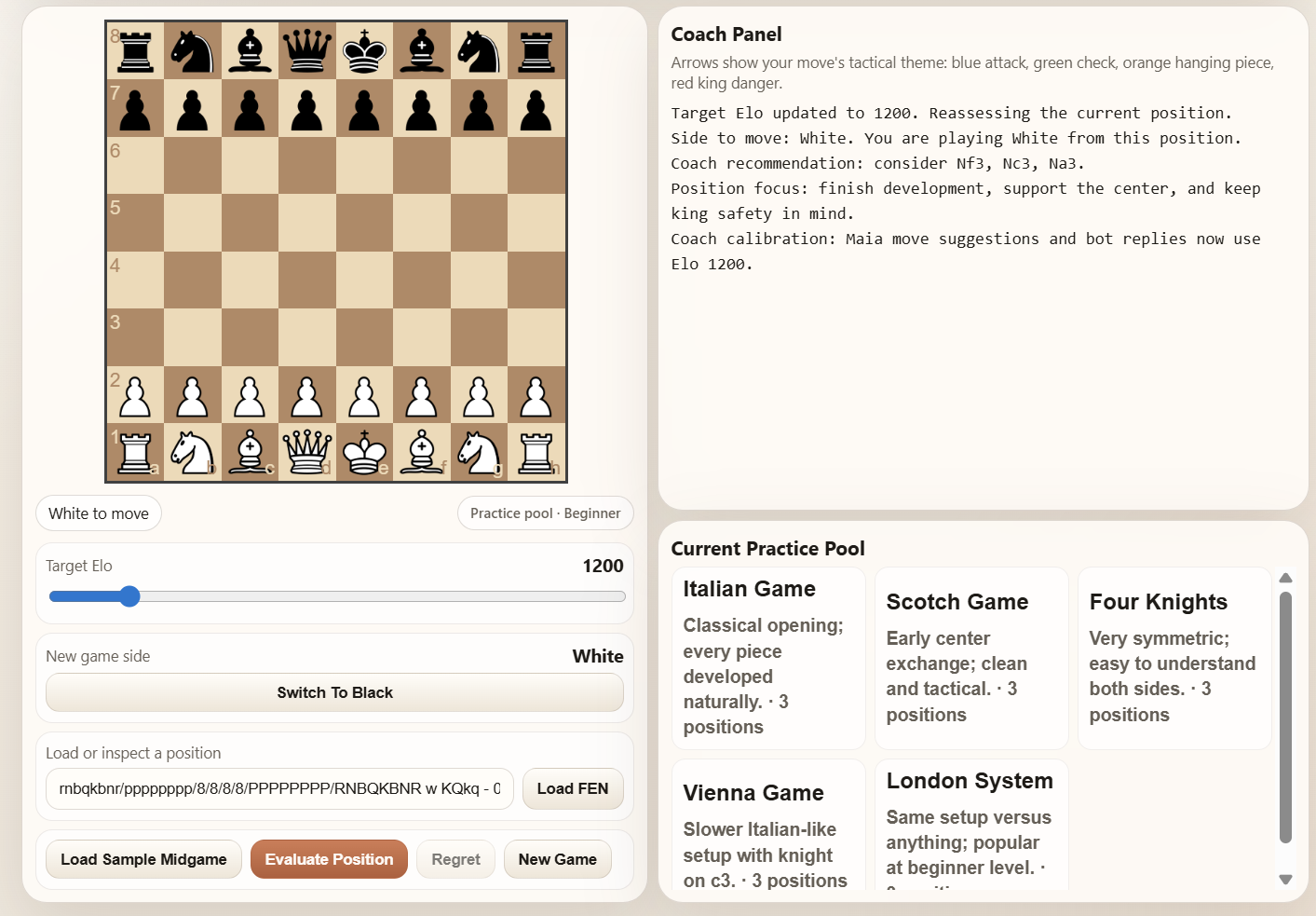
Figure 3.4b — Practice pool at Elo 1500 (Club band).
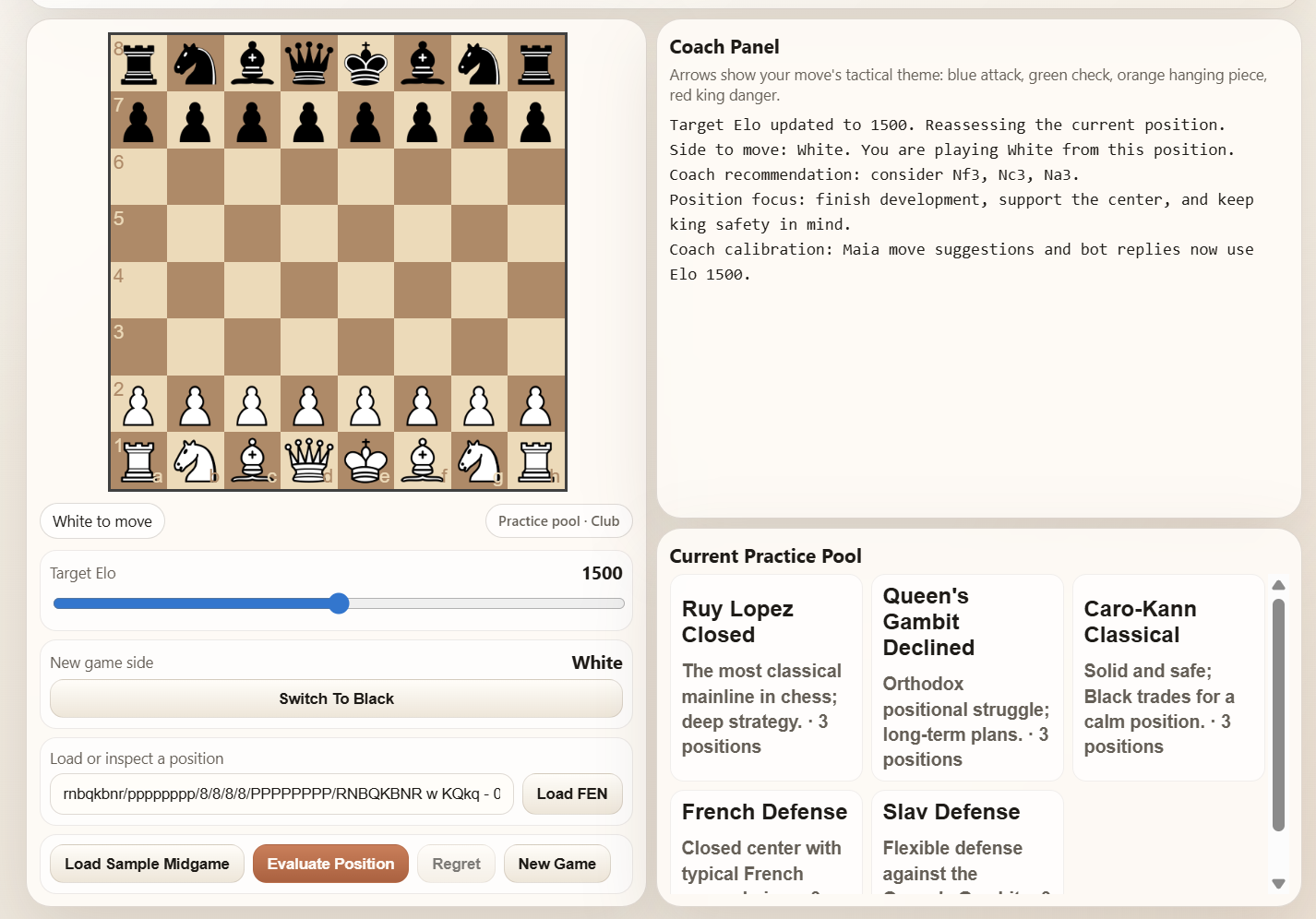
Figure 3.4c — Practice pool at Elo 1800 (Advanced band).
The Evaluate Position button calls
evaluate_position_report(). Instead of printing
+0.3 it walks through three things in prose:
This is the feature that directly fulfils the A+ rubric bullet from the assignment: “your system should allow the user to setup a position and have it evaluated by your teacher for a pre-specified ELO.”
Figures 3.5a–b illustrate the feature on the same middlegame FEN evaluated at two different Elo bands. The candidate moves listed in Coach recommendation shift with the band, and the position-focus line changes in tone as well. This is the concrete evidence that the pre-specified Elo really flows through the evaluation pipeline.
Figure 3.5a — Same position, evaluated at Elo 1200.
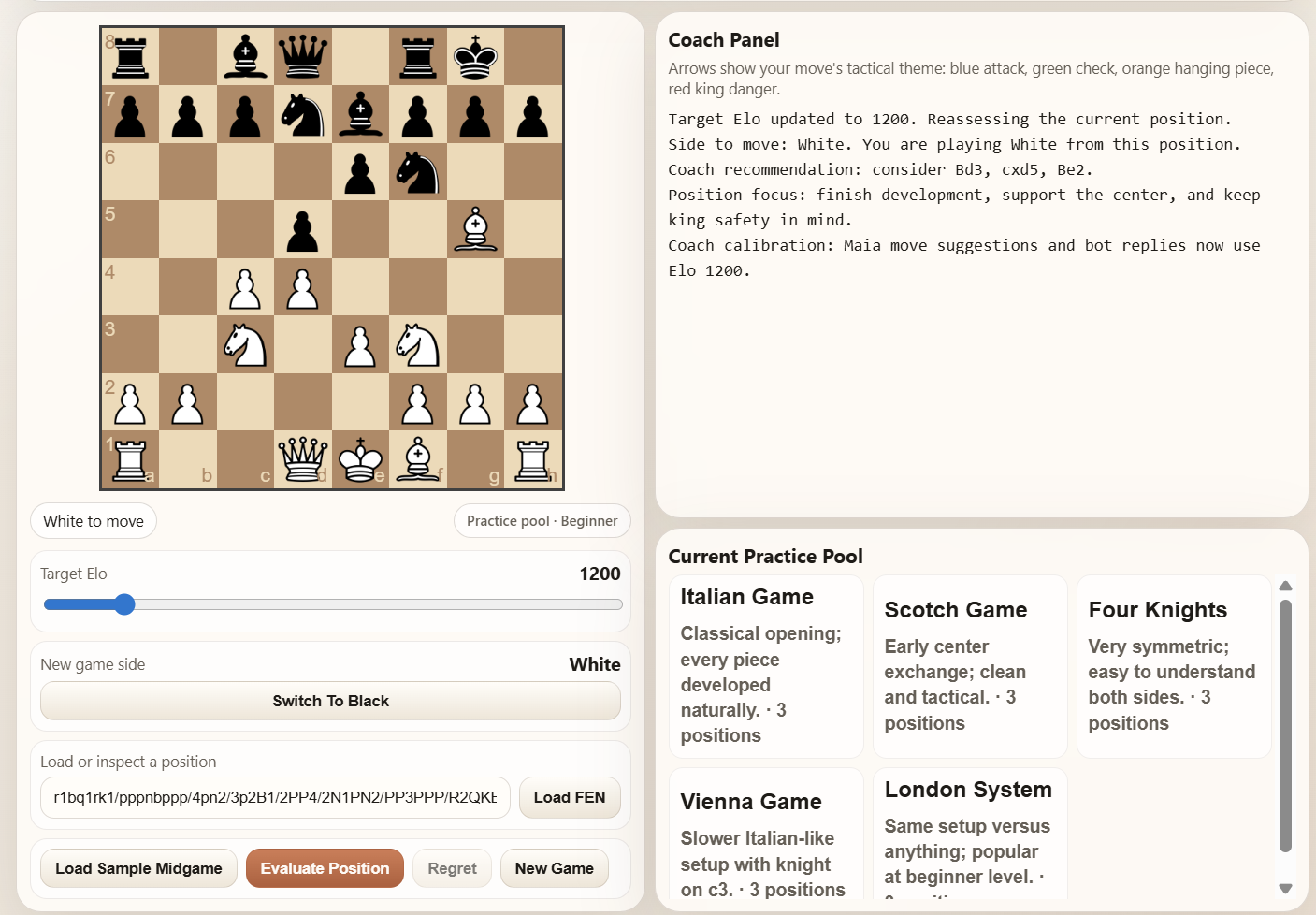
Figure 3.5b — Same position, evaluated at Elo 1800.
ChessTutor._elo_band() maps Elo to beginner
/ club / advanced, and
build_coaching_lines() adjusts the final reminder line
accordingly:
An engine has no notion of the student. It prints the same output to a beginner and to a grandmaster.
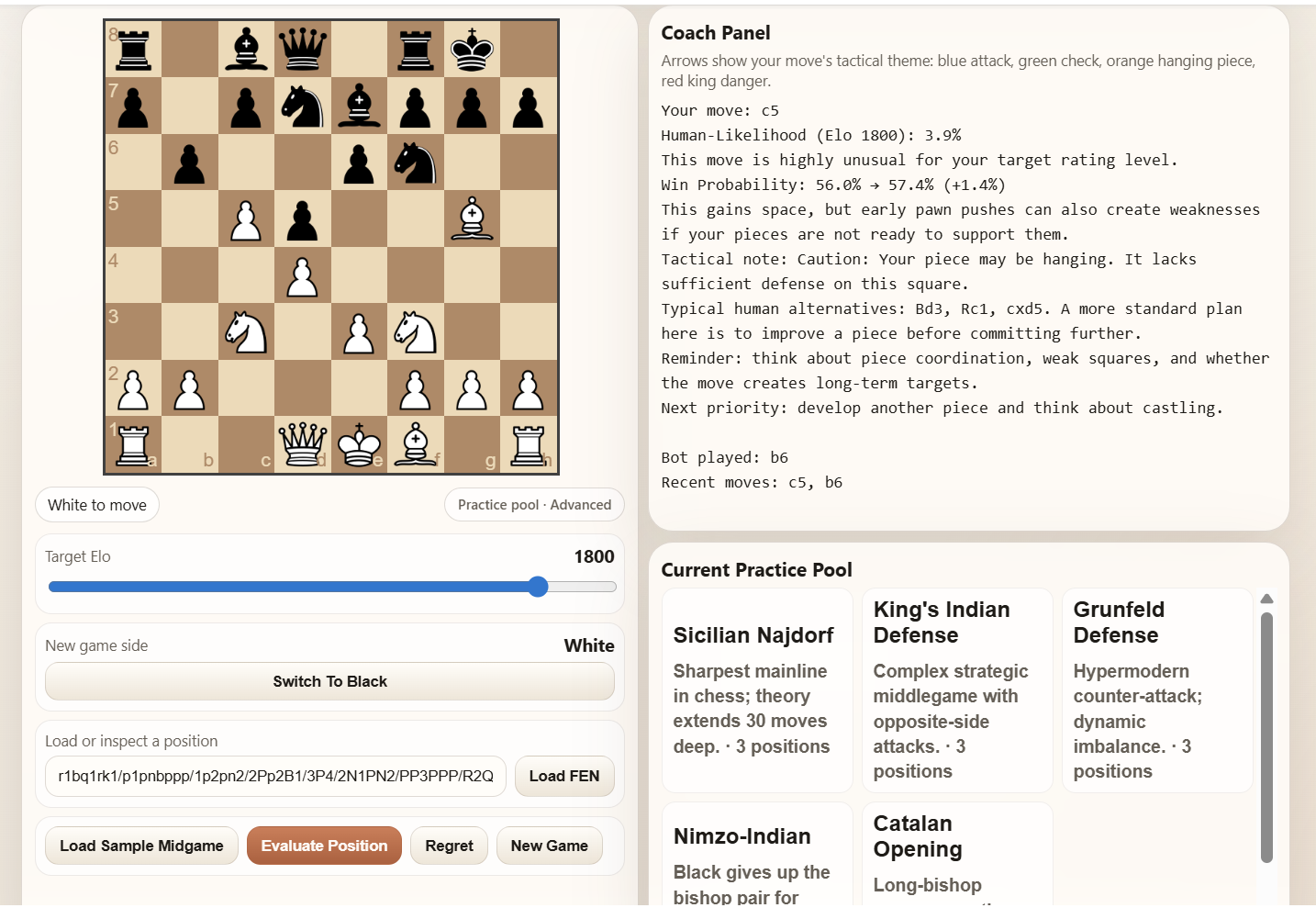
Figures 3.6a–b show the same user move analyzed at two Elo bands. The Human-Likelihood percentage, the “typical alternatives” list, and the closing reminder all shift with the slider — the same move receives a different coaching frame depending on who the student is supposed to be.
Figure 3.6a — Move analysis at Elo 1200.
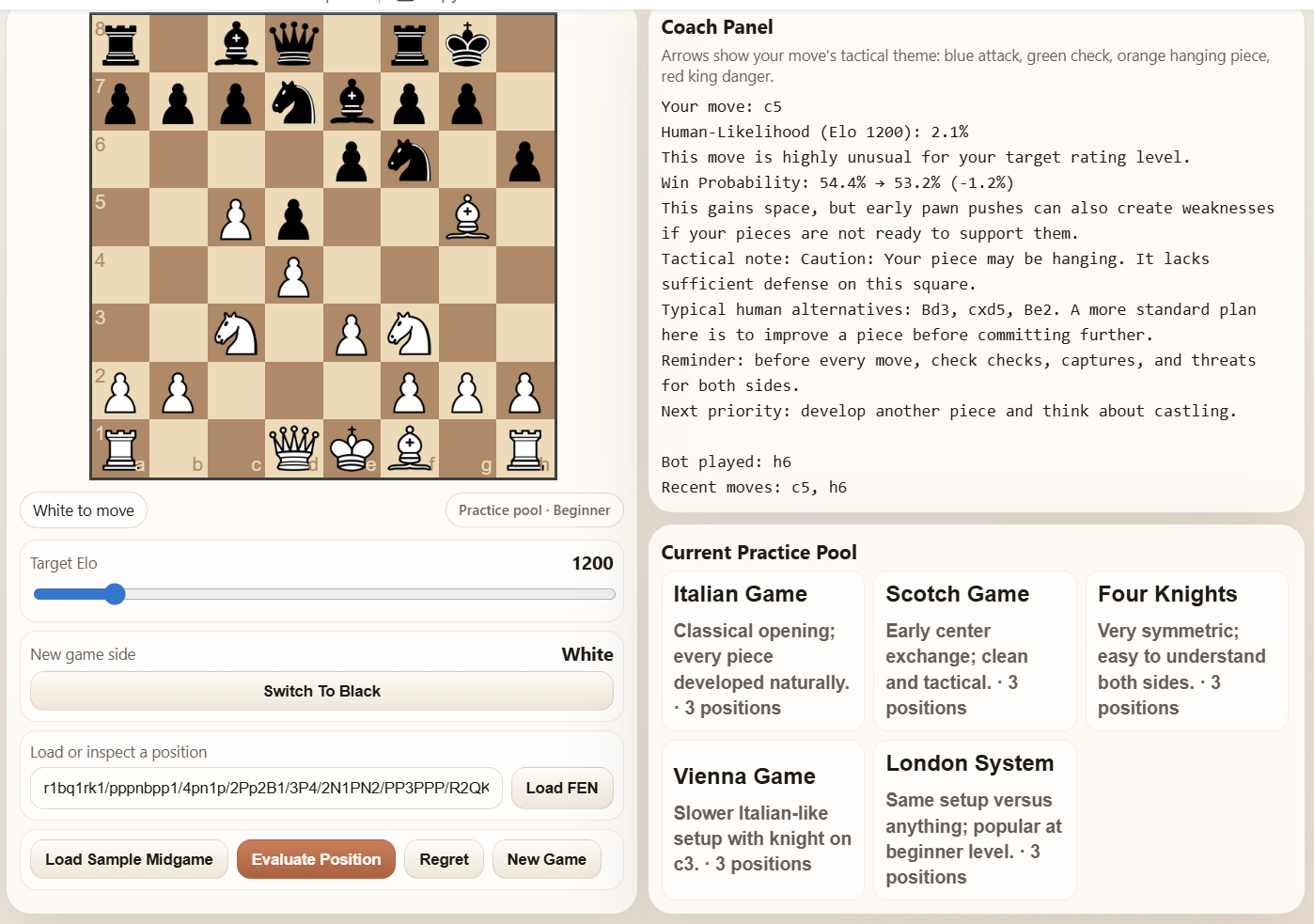
Figure 3.6b — Move analysis at Elo 1800.
This section records short observed sessions with the revised notebook. The goal is not to claim formal evaluation; it is to show what the tutor sounds like in practice, where it helps, and where its abstractions still look odd.
Note on reproducibility: the bot samples its reply from Maia-2’s top-5 human-likely moves (weighted by probability), so rerunning the same session may produce slightly different move orders and percentages. The tutor’s behavior and the qualitative conclusions below are stable across reruns.
Starting condition: new game, Elo slider at 1200.
Before any move, Evaluate Position produced:
Position evaluation mode
Side to move: White. You are playing White from this position.
Coach recommendation: considerNf3, Nc3, Na3.
Position focus: finish development, support the center, and keep king safety in mind.
That opening recommendation is already revealing: the tutor is not trying to play “best chess” from move one. It is trying to stay inside Maia-2’s human distribution at the chosen Elo.
The student then played e4. The coach panel said:
Your move:
e4
Human-Likelihood (Elo 1200): 4.0%
This move is highly unusual for your target rating level.
Win Probability: 40.8% → 71.1% (+30.3%)
This fights for central space and can make development easier for the rest of your pieces.
This is a good example of the tutor’s central idea. The move can be strategically good while still being statistically unusual for the chosen rating. That is exactly the distinction the project is trying to preserve instead of collapsing everything into one number.
After Maia replied Nc6, the student played
Nf3. The tutor responded:
Your move:
Nf3
Human-Likelihood (Elo 1200): 14.2%
This move is somewhat uncommon for your target rating level.
Typical human alternatives:Bb5, Bc4, Nc3.
Reminder: before every move, check checks, captures, and threats for both sides.
The important part is the reminder line. At the beginner band, the notebook is not trying to impress the user with deep strategy. It is reinforcing a simple thinking process.
A third move, Bc4, produced a noticeably calmer
response:
Your move:
Bc4
Human-Likelihood (Elo 1200): 31.3%
This is a fairly standard human move for the chosen rating.
This develops a bishop and helps your pieces coordinate more naturally.
The end-of-game summary over these three user moves reported an
average human-likelihood of 16.5%, exactly one
“unusual” move, and identified e4 as the largest positive
swing by the tutor’s own win-probability metric.
What felt useful: the tutor gave the player a plan, then a process, then a next priority. A raw engine would have reduced the same opening to a number and an opaque principal variation.
What looked odd: Maia-2 assigning only
4.0% to 1.e4 at Elo 1200 is a reminder
that the system is not calibrated like a classical opening book. That
does not break the coaching layer, but it does show why the notebook
should be understood as a human-aligned tutor rather than an objective
move oracle.
Starting condition: loaded sample position from the advanced pool, specifically the built-in Catalan middlegame FEN, with the slider at 1700.
The initial position evaluation read:
Position evaluation mode
Side to move: White. You are playing White from this position.
Coach recommendation: considerQc2, Ne5, Nc3.
Position focus: finish development and use your pieces to keep the king area secure.
Assessment: White should play carefully; the position is somewhat uncomfortable.
This tone is already different from the 1200 session. There is no beginner checklist. The tutor assumes the player can compare plans and work with a more abstract positional summary.
The student then chose the top Maia move, Qc2. The tutor
said:
Your move:
Qc2
Human-Likelihood (Elo 1700): 33.5%
This is a fairly standard human move for the chosen rating.
Win Probability: 53.1% → 51.8% (-1.3%)
Reminder: think about piece coordination, weak squares, and whether the move creates long-term targets.
After the bot replied a6, reevaluating the position
produced a new set of candidate moves: Qxc4, a4, e4. That
shift is exactly the kind of interaction the project wants. The tutor
does not just emit one static recommendation; it updates the planning
surface after each exchange.
What felt useful: the coaching language became more strategic rather than more verbose. The advanced band reminder is about weak squares and long-term targets, not just checks and captures.
What looked odd: the tutor said the move
Qc2 improved positional control while its Maia-based win
probability dropped slightly. That disagreement is not a bug in the
code; it comes from the project intentionally combining a learned
human-aligned model with a separate heuristic evaluator. But it is still
a real interpretation wrinkle for the user.
For a reproducible position-review case study, we used the built-in Catalan sample FEN from the advanced pool:
rnbq1rk1/ppp1bppp/4pn2/8/2pP4/5NP1/PP2PPBP/RNBQ1RK1 w - - 0 7
At Elo 1700, Evaluate Position returned:
Side to move: White. You are playing White from this position.
Coach recommendation: considerQc2, Ne5, Nc3.
Position focus: finish development and use your pieces to keep the king area secure.
Assessment: White should play carefully; the position is somewhat uncomfortable.
This is a strong example of the tutor behaving like a study aid instead of a black-box engine. The recommendation is not “White is +0.2.” It is “here are three human-like plans, and here is the kind of middlegame you are in.” For a student trying to remember what to do in a Catalan structure, that framing is much easier to act on.
At the same time, the case study also shows the system’s current ceiling. The tutor tells the user what kind of plan to look for, but it does not yet explain the deeper Catalan ideas in opening-specific language: pressure on the long diagonal, the c4 pawn, or the relation between queen development and piece activity. In that sense, the notebook succeeds as a general-purpose coach more than as a specialized opening explainer.
ChessTutor.history) for
the end-of-game summary, but nothing persists across notebook restarts.
A longitudinal “your weak squares this week” feature is explicitly out
of scope.board_assets/ has already been warmed.The headline claim is narrow: a beginner running this notebook gets something more useful than a beginner running Stockfish on the same position. The mechanism is not model scale — Maia-2 is much smaller than Stockfish and plays weaker moves — it is alignment with the student. The bot plays at the student’s level, the commentary is prose, tactics are named, and the practice pool is curated. Everything the student sees is something they can act on at their current Elo, which is the rubric the assignment actually cares about.
The gap between “strongest move” and “most useful move” is the gap this project is trying to close. The walkthroughs above are our evidence that, for this specific use case, a human-aligned imitation model plus a thin coaching layer closes it more effectively than a Grandmaster-strength engine ever could.
python-chess library. Niklas Fiekas. python-chess.readthedocs.iochessboard.js v1.0.0. Chris Oakman. chessboardjs.comThe repository includes the following screenshots used throughout §3:
Section 3.1 (Feedback calibrated to Elo): -
report_images/3_1_move_analysis_elo1200.png -
report_images/3_1_evaluate_position_elo1200.png -
report_images/3_1_move_analysis_elo1800.png -
report_images/3_1_evaluate_position_elo1800.png
Section 3.2 (Coaching prose vs Stockfish centipawn output): -
report_images/3_2_tutor.png -
report_images/3_2_stockfish.png
Section 3.3 (Named tactics — detector screenshots): -
report_images/3_3_pin.png -
report_images/3_3_fork.png
Section 3.4 (Sample midgame pool across bands): -
report_images/3_4_pool_elo1200.png -
report_images/3_4_pool_elo1500.png -
report_images/3_4_pool_elo1800.png
Section 3.5 (Evaluate Position at two Elos, same FEN): -
report_images/3_5_evaluate_elo1200.png -
report_images/3_5_evaluate_elo1800.png
Section 3.6 (Move analysis tone across levels, same FEN and move): -
report_images/3_6_move_elo1200.png -
report_images/3_6_move_elo1800.png
Any remaining UI states discussed in this appendix are reproducible directly from the notebook. The revised interactive board exposes the sample-pool panel and tactical arrows live in the IFrame, so additional screenshots can be captured from the local demo without extra tooling.